A technical study of controlled automotive imaging
Change the setting. Keep the car.
High-resolution matting, deterministic studio compositing, and carefully bounded diffusion. How AutoBG turns everyday vehicle photographs into grounded studio scenes without asking a model to redraw the vehicle.
Part I / The problem
Background removal is only the beginning.
A clean cutout is not a believable studio image. A vehicle can have sharp edges and still look pasted onto a floor because the wheels do not touch their shadows, the reflection starts at the wrong height, or the old background's color survives around the mirrors. AutoBG addresses the whole composition rather than stopping at segmentation.
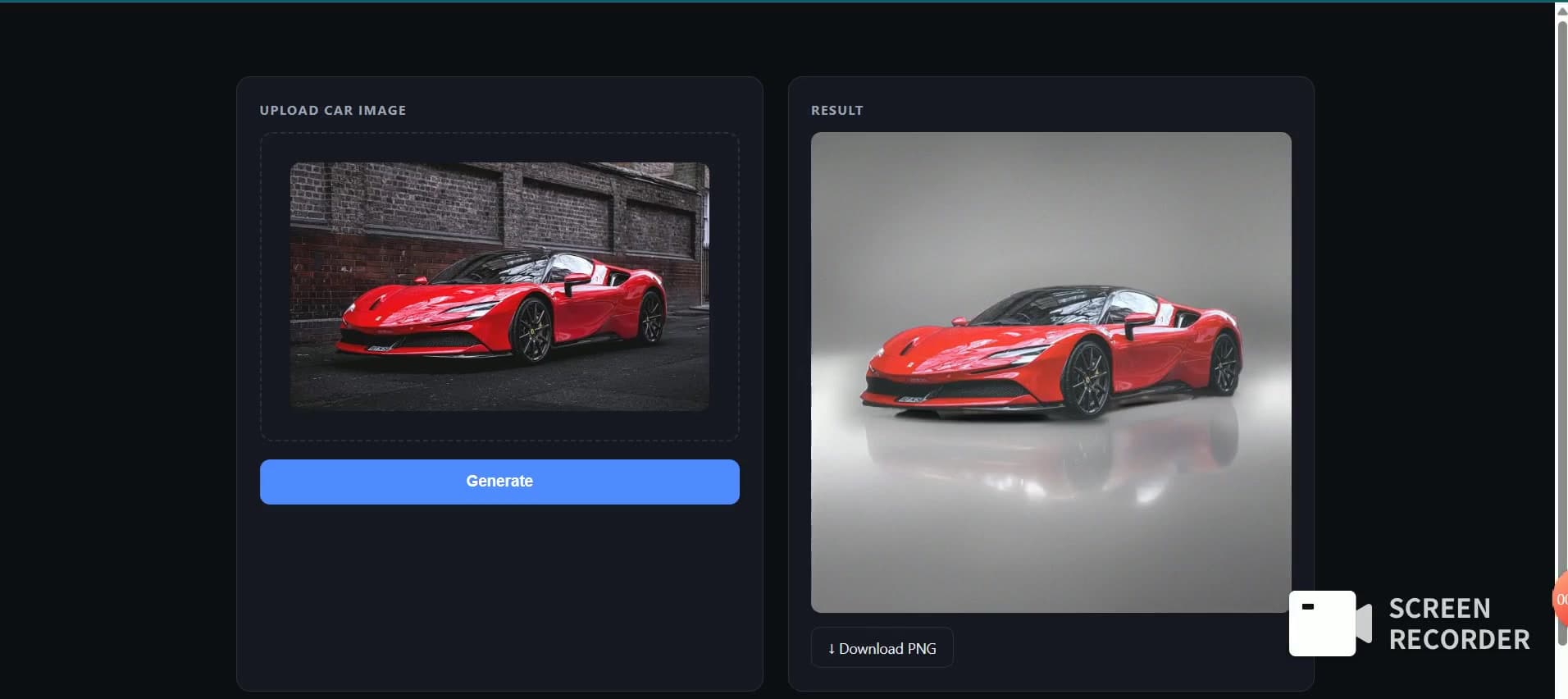
The product takes an uploaded car photograph, separates the vehicle with a high-resolution alpha matte, places it in a selected studio, and returns a downloadable PNG. Geometry and image-processing operations handle placement, contact, and edge integration. Diffusion is reserved for the parts of the scene where generation is useful.
Part II / The system
One matte, three rendering paths.
The frontend sends a multipart request to FastAPI. Input decoding, validation, downscaling, and segmentation are shared across modes. The resulting RGBA cutout is dispatched to a deterministic template compositor, a floor-reflection generator, or a full-background generator.
| Mode | What changes | Primary implementation |
|---|---|---|
| template | Prepared studio, geometric reflection, shadows, and integration | compositing; no diffusion after matting |
| reflect_ai | A bounded floor reflection band within the prepared studio | reflect_gen using the shared SDXL pipeline |
| ai | The wider background, followed by source-cutout reintegration | aigen using SDXL and Canny ControlNet |
The API defaults to template when no mode is supplied. The current browser interface explicitly sends reflect_ai and white_studio. The API therefore exposes more rendering choices than the present UI. In the reviewed dispatcher, any unrecognized mode also falls through to template; it is not a strict enum-validation endpoint.
Part III / Image formation
Continuous alpha preserves the edge.
BiRefNet HR produces a continuous opacity estimate instead of a coarse binary foreground mask. This matters around mirrors, tires, chrome, and fine silhouette details, where a hard yes/no cutout can discard structure or preserve the old background.
The default model identifier is ZhengPeng7/BiRefNet_HR and the internal inference size is 2048 by 2048. RGB input is resized and ImageNet-normalized, passed through the model, and converted from the final prediction through sigmoid into alpha. The alpha map is resized with LANCZOS back to the processed input's dimensions and attached to the RGB image.
I = alpha * F + (1 - alpha) * B

I : observed image color
F : foreground vehicle color
B : background color
alpha : continuous opacity in [0, 1]
The API may first reduce a large upload to MAX_INPUT_SIDE, default 2048. Returning alpha at the input resolution therefore refers to the downscaled image passed to segmentation, not necessarily the original camera file's full resolution. Segmentation selects CUDA when available; the SDXL generation path explicitly requires CUDA.
Part III / Image formation
Solve the color contamination, not only the mask.
Semi-transparent edge pixels mix the foreground with the old background. Simply placing those pixels on a white studio can leave a colored fringe. The compositor first attempts foreground-color estimation with PyMatting. If that path is unavailable, a guided color-diffusion fallback propagates interior colors into the edge band.
Alpha tightening then suppresses faint low-opacity glow, contracts the matte by roughly one pixel with a small elliptical erosion, and applies anti-aliasing. The objective is a cleaner boundary without indiscriminately blurring the entire subject.
| Operation | Why it exists | Failure to watch |
|---|---|---|
| Foreground recovery | Remove background color mixed into translucent edge pixels | Residual color fringe or overcorrected paint color |
| Alpha tightening | Reduce the faint halo outside the silhouette | Thin mirrors or fine details eroded away |
| Anti-aliasing | Avoid visibly jagged boundaries | An overly soft tire or body edge |
| Lighting integration | Reduce the pasted-on appearance | Unintended exposure or color changes |
Part III / Image formation
Ground the wheels before adding atmosphere.
The template path uses a saved studio plate when one exists, otherwise a procedural wall/floor background. The cutout is cropped, scaled, and positioned on the canvas. Placement is paired with a per-column ground contour computed from the lowest opaque pixel of the vehicle silhouette.
The reflection mirrors each column about its own contact height, rather than flipping the whole bounding box about one horizontal line. This distinction matters for a three-quarter view where the front and rear wheels occupy different image heights. Reflection opacity fades with distance and blur increases away from contact.
Contact shadows combine a soft ambient layer along the underside with darker cores around wheel-contact columns. White-balance adjustment, ambient floor bounce, edge light wrap, and seeded grain integrate the subject and background after geometry has been established.
| Layer | Geometric or photometric responsibility |
|---|---|
| Studio plate / procedural scene | A consistent wall, floor, horizon, and perspective |
| Per-column ground contour | Contact height appropriate to the photographed viewpoint |
| Reflection | A fading, depth-softened mirror anchored to the contour |
| Shadow | Soft body occlusion plus darker wheel contact |
| Realism pass | White balance, floor bounce, edge light, and texture consistency |
Part IV / Bounded generation
Generate only the part that needs generation.
The default UI path builds a prepared car-and-studio composite, initializes a geometric reflection, and asks SDXL to refine a masked floor band. A contour-following mask restricts the edit. Canny edges provide structural conditioning, while a fixed seed and configurable diffusion settings make experiments easier to compare.
| Reflection control | Reviewed default | Meaning |
|---|---|---|
| REFL_STEPS | 22 | Configured inference-step budget |
| REFL_STRENGTH | 0.32 | Denoising strength relative to the initialized reflection |
| REFL_CN | 0.70 | ControlNet conditioning scale |
| REFL_GUIDE | 6.0 | Text guidance scale |
| REFL_BLEND | 0.50 | Geometric contribution to the AI/geometric mixture |
| REFL_SEED | 7 | Generator seed |
The generated result is blended with the geometric initialization, softened, and pasted back through the floor mask. This avoids using an unconstrained generated image as the entire final result. A stronger diffusion setting can add detail, but it can also introduce duplicates, distorted wheels, or a reflection that no longer corresponds to the subject.
Part IV / Bounded generation
A broader edit needs a stronger reintegration path.
Full-background mode places the vehicle on a working canvas and marks the background for inpainting. The shared SDXL ControlNet pipeline generates the surrounding scene with template-specific prompts and Canny guidance. The source cutout is subsequently cleaned and composited back into the generated scene.
Post-processing suppresses the bright floor halo sometimes produced near the car, adds dedicated contact shadows, harmonizes exposure and color statistics, refines the edge with a guided filter, and applies light wrap and grain. These operations are necessary because a plausible background and a good matte do not automatically form a coherent photograph.
| Model | Responsibility |
|---|---|
| stabilityai/stable-diffusion-xl-base-1.0 | The base diffusion model |
| diffusers/controlnet-canny-sdxl-1.0 | Edge-conditioned structural guidance |
| madebyollin/sdxl-vae-fp16-fix | FP16 VAE used by the CUDA pipeline |
The default working size is 1024 by 1024, with 30 configured inference steps, guidance 7.0, and ControlNet scale 0.5. These are code defaults, not a measured best setting for every input image. The renderer's output size also differs from the template compositor, so the API should not be described as returning one universal dimension for all modes.
Part IV / Bounded generation
Prepare reusable studios; isolate experiments.
Offline plate preparation
The make_plate utility takes a reference studio photo, segments the car, expands the removal mask to cover nearby shadow/reflection, and inpaints an empty studio. The saved plate can be reused by the deterministic compositor. This is an offline preparation step, not an extra generation pass in every request.
Conditioned relighting
A separate IC-Light FBC module experiments with foreground/background-conditioned relighting. It uses a Realistic Vision V5.1 SD1.5 base, patches the UNet input to accept the noisy latent plus foreground and background conditioning latents, and merges IC-Light offset weights. The documented inference works at SD1.5's 512-scale before upscaling.
Part V / Product and runtime
A small API with an explicit output contract.
| Endpoint | Behavior |
|---|---|
| GET / | Returns service status and active matting model identifier |
| GET /templates | Lists available studio templates |
| POST /process | Accepts an image plus template/mode fields; returns image/png bytes |
POST /process
Content-Type: multipart/form-data

file     = uploaded image
template = white_studio
mode     = reflect_ai

Response: image/png (binary)
Empty uploads and unreadable images return 400 errors. Segmentation and renderer failures return 500 responses with the failing stage's message. The frontend receives the PNG as a blob, creates an object URL, previews it, and offers a local download.
The browser's progress bar is estimated, not backend telemetry: it approaches 90% using an elapsed-time curve and completes when the server response arrives. This avoids pretending that a waiting browser knows the actual diffusion step count. It must not be presented as a real-time GPU progress feed.
Part V / Product and runtime
Spend GPU time where it changes the result.
The README reports approximate NVIDIA L4 request timings of 0.7 seconds for template composition, 13 seconds for AI reflection, and 18 seconds for full-background generation. The graph reproduces those reported values on one seconds axis. It is a mode-cost comparison, not a new benchmark performed for this portfolio.
Three modes. Different inference budgets.
The template mode avoids diffusion after matting. Reflection mode pays for a constrained generated region. Full-background mode pays for a wider generative scene and a reintegration chain. This separation gives the caller a meaningful quality/consistency/cost choice instead of running the largest available model for every operation.
Startup warms matting and, by default, attempts to preload SDXL through WARM_SDXL. The SDXL and ControlNet objects are reused by reflection and background modes. Cold model download/loading, GPU memory pressure, input dimensions, package versions, and renderer settings can all change end-to-end latency.
Part VI / Operating the system
Keep responsibilities small enough to inspect.
| Module | Responsibility |
|---|---|
| main | Decode, validate, downscale, segment, dispatch, and return PNG |
| segment | Cached BiRefNet inference and continuous-alpha RGBA output |
| compositing | Studio assets, edge recovery, placement, reflections, shadows, and realism |
| reflect_gen | Reflection mask, initialized mirror, SDXL conditioning, and local paste-back |
| aigen | Shared diffusion loader, background generation, and scene integration |
| make_plate | Offline construction of reusable empty studio plates |
| iclight | Independent experimental conditioned-relighting path |
| Frontend | Upload state, estimated progress, before/after previews, and PNG download |
What to evaluate next
- Use a held-out set of side, front, and three-quarter views, including mirrors and fine trim.
- Measure silhouette/edge quality separately from foreground color preservation.
- Inspect wheel contact, reflection correspondence, duplicate-car artifacts, and floor halos.
- Compare all modes with fixed inputs and explicit settings, recording cold and warm timings separately.
- Test empty, oversized, malformed, no-car, and concurrent requests before making an operational reliability claim.
Observability should distinguish decode errors, segmentation failures, model-load failures, out-of-memory conditions, and renderer errors. Stage timings and the selected mode/model/configuration are more actionable than a single total request duration. Any production queue or retry layer should also make GPU work idempotent and avoid silently duplicating expensive generation.
Closing / Engineering judgment
The boundary is the feature.
AutoBG's central choice is selective generation. Continuous matting protects the silhouette; deterministic compositing establishes placement and ground contact; diffusion is given a bounded region or an explicit reintegration path. The result is easier to reason about than a single unconstrained prompt to redraw the scene.
- Fix foreground color contamination as well as alpha quality.
- Anchor reflections and shadows to the actual silhouette, not only its bounding box.
- Separate reusable scene preparation from online inference.
- Use explicit generation boundaries, reproducible settings, and source-cutout reintegration.
- Keep prototype behavior, README timings, experiments, and future hardening clearly distinguished.